Notice: Function _load_textdomain_just_in_time was called incorrectly. Translation loading for the politicem domain was triggered too early. This is usually an indicator for some code in the plugin or theme running too early. Translations should be loaded at the init action or later. Please see Debugging in WordPress for more information. (This message was added in version 6.7.0.) in /home/h6bzbkr0l36n/public_html/educationspoint/wp-includes/functions.php on line 6131
How to find Hard Disk Name in Windows 10 OS from Command Prompt (CMD) - Education Point

How to find Hard Disk Name in Windows 10 OS from Command Prompt (CMD) - Education Point

Windows OS - Knowledge Base

How to find Hard Disk Name in Windows 10 OS from Command Prompt (CMD)

Synopsis

To check the Hard Disk Name from command prompt in Windows 10 OS

Steps :-
  1. Go to  Start.
  2. Search for the Command Prompt and open the command prompt with Administrator
  3. Enter the following Command to find the serial number of  device “wmic bios get SerialNumber
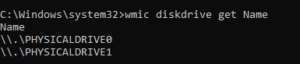
> wmic diskdrive get Name
Name
\\.\PHYSICALDRIVE0
\\.\PHYSICALDRIVE1
Windows OS - Knowledge Base

CONTACT US

Phone: +99 858 547 589
Email : politic@email.com
Address: House 10, Road Nomber 32 Mohammadpur, Dhaka 1212.

INSTAGRAM PHOTOS

Copyright © Politic. All Rights Reserved.